Web form settings
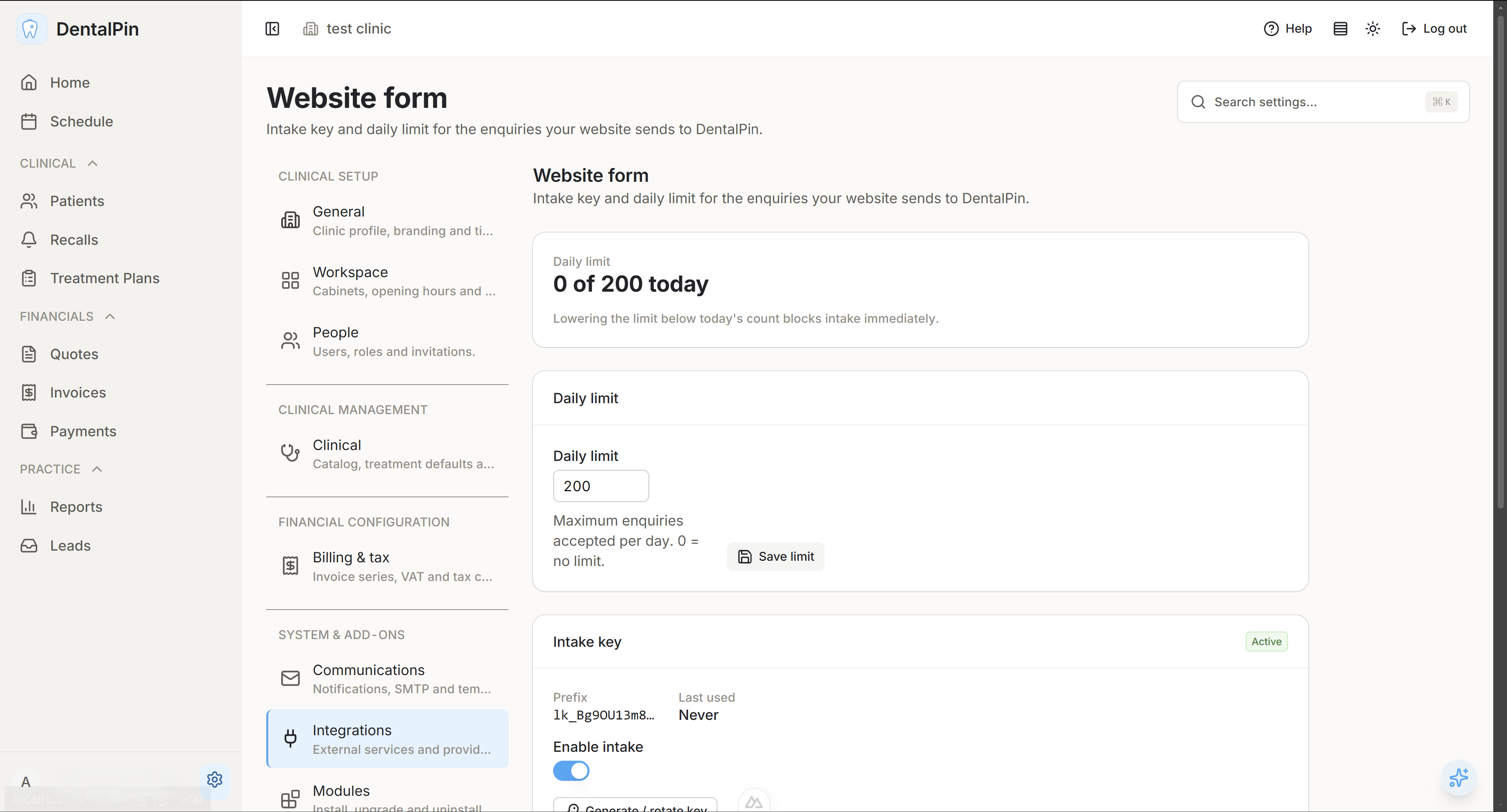
Page at Settings → Integrations → Website form (Formulario web) — administrators only. Everything the clinic website form needs lives here: how many enquiries are accepted per day and the key that authorises the form.
Daily limit
The daily limit is the maximum number of enquiries accepted in one day for this clinic.
0means no limit — the form always accepts.- The value must be between
0and5000. Saving an out-of-range number is rejected by the server. - Lowering the limit below the number already received today blocks the form immediately. That is the emergency lever when the form is being flooded: set it to the current count and no further enquiry gets through. It deletes nothing and it does not reset anything.
- The limit is per clinic and it is stored with your clinic data, not in a server configuration file — you can change it in the middle of a campaign without anyone restarting anything.
Today volume
Next to the limit you see the gauge: "37 of 200 today". It counts every enquiry that reached the intake endpoint today, including the ones that turned into a call-back in Recalls and the ones blocked by the limit itself — so after a flood the number keeps growing even though the form is answering too many requests. When the limit is reached a warning replaces it: intake is paused until tomorrow.
With the limit at 0 the count is shown on its own, with no denominator.
The counter is reset by the date changing, and by nothing else: saving the limit, rotating the key or disabling it deliberately leave today count alone.
Intake key
The intake key is the password the website form sends on every enquiry. It is what makes the endpoint refuse everyone else.
- The full key is shown once, when you generate or rotate it. Copy it then — afterwards you only ever see its prefix (for example
lk_AbC12xYz), whether it is active, and when it was last used. - Generate / rotate mints a new key (or replaces the current one). The old key stops working the instant you rotate.
- Disable (the active toggle) is the kill switch: the key stays in the system but every enquiry is refused until you enable it again.
- With no key configured, intake is closed — the form is refused.
Rotate or disable?
- Rotate when the key has leaked or been shared: legitimate enquiries keep working with the new key, and the leaked one is dead.
- Disable when you want intake to stop completely for a while.
Paste the new key into your website before you close this page. The form fails until the site sends the new key — that is why rotation is an administrator action and not something the front desk can do by accident.
Intake URL and example
The page shows the full intake URL. It is built from the API address of your installation (the same one the app itself talks to), not from the app URL: when the API is served on its own host or port — as in a local development setup (http://localhost:8000) — that is the host your website must call. Posting to the app URL instead answers with a login redirect, not with {"received": true}. In a deployment where one web server (Caddy) fronts both the app and the API, the two are the same origin and the URL is simply https://your-clinic.example.com/api/v1/leads/public/intake.
Copy next to the URL copies it straight to the clipboard, and Copy above the example below copies the whole request — paste it into a terminal (or hand it to your web developer) and replace the placeholder key with the real one:
curl -X POST https://your-clinic.example.com/api/v1/leads/public/intake \
  -H "Content-Type: application/json" \
  -H "X-Lead-Key: lk_xxxxxxxxxxxxxxxx" \
  -d '{
        "full_name": "Marta Ruiz",
        "phone": "+34 600 111 222",
        "email": "marta@example.com",
        "motive": "Presupuesto de ortodoncia",
        "description": "Viene de Instagram.",
        "availability_days": ["tue", "thu"],
        "availability_slot": "afternoon"
      }'
A correct submission always answers the same thing:
{ "data": { "received": true }, "message": null }Notes for whoever builds the form:
- The response never says whether the person was already a patient. It is the same answer for everyone, on purpose.
descriptionis optional; the other fields are required.- Availability is optional and structured: send the days you offer in
availability_daysusing the codesmon tue wed thu fri sat sun, and optionallyavailability_slotasmorning,afternoonorevening. The front desk sees them as a week strip. Any order is fine — the server stores them Monday-first and drops duplicates — but this is the one field that is not free text: a sentence typed here is rejected. - Keep the hidden
websitefield in the form and leave it empty: it is a trap for bots, and a filled one is accepted silently and thrown away. - The recommended integration is a server-side POST from your website or hosting platform. A browser
fetch()straight from the clinic site also needs that site origin allowed in the server CORS configuration. Be aware of what a browser-side form means for the key: it sits in the page source, so anyone can read it and post to your intake as if they were your form. Nothing breaks — requests still arrive — but the key is no longer a secret, and the rate limits plus the daily limit become your only protection. Prefer server-side, and set the daily limit to a number you would be happy to see arrive in a day. - Remember the routing rule when you write the confirmation message on your site: an enquiry whose phone or email already belongs to a patient does not create a lead, it adds a call-back in Recalls. Do not promise "we created your enquiry" to someone who is already a patient.